
For salons, clinics & studios
ONLINE APPOINTMENT BOOKING.
Stop taking bookings by text message.
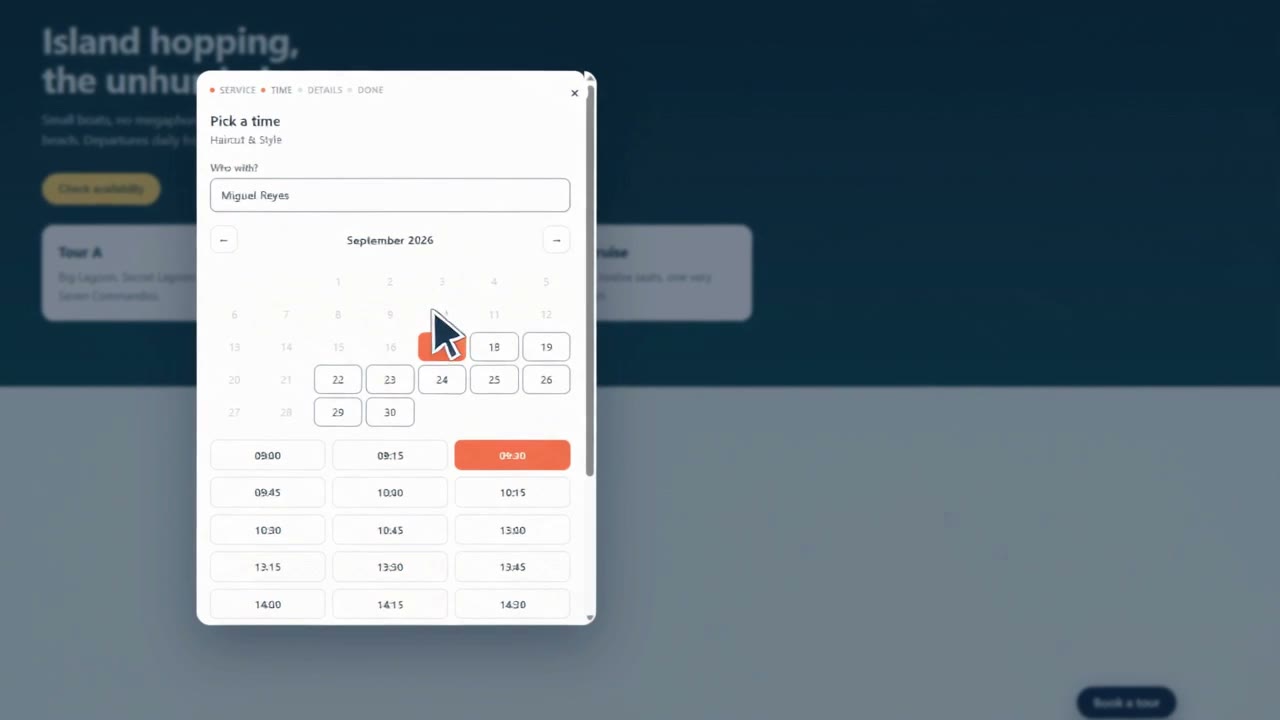
Lazavee is appointment booking software for salons, clinics and studios. Add a booking widget to your existing website so customers can choose a service, staff member and available time, even when you cannot answer the phone.
No card. Set up in about ten minutes.
01 / Make yourself bookable
A BOOKING WIDGET.
ON YOUR WEBSITE.
No plugin, no developer. Keep the website you already have. Add your booking widget wherever you want it.
The installation snippet
<script src="https://booking.lazavee.com/v1/widget.js"
        data-key="pk_live_your_key"
        data-target="#booking" defer></script>
Your key connects it to your business. #booking is the place you choose on your page.
- 01
Tell it what you sell
Your services, how long each takes, who can do them, and when you are open. A guided checklist walks you through it.
- 02
Paste the line
Works on WordPress, Wix, Squarespace, Shopify or a page your cousin built in 2019. No plugin, no developer.
- 03
Bookings arrive
Confirmations and reminders send themselves. Your calendar fills in while you are with a customer.
Sound familiar?
You already have a booking system.
It is your phone.
Messages at eleven at night.Answered the next morning, by which time they have booked somewhere else.
Two people, one slot.Written in a notebook by two members of staff, discovered on the day.
No-shows you did not see coming.Nobody sent a reminder, because nobody had time.
02 / The boring things, done properly
TWO PEOPLE.
ONE SLOT.
ONE BOOKING.
Two people cannot take the same slot.
If two customers tap 2 pm in the same second, exactly one gets it and the other is told immediately. That is enforced by the database, and tested by eight processes racing the same slot on purpose.
Small on your website
3.4 kB.
Zero cookies.
One less thing.
The widget sets no cookies at all. No tracking, no third-party scripts. Adding it to your site adds no cookie banner on our account.
3.4 kB is the compressed widget loader.
03 / Keep the day moving
Your staff can
run the day.
Without fetching the owner.
A receptionist can take a phone booking, mark a no-show and run the day without an owner's login.
The times are right. Even on the awkward days.
Availability is calculated, never stored. A customer in another country sees their own clock and you see yours. Daylight saving loses exactly one hour in spring and gains one in autumn.
A failed email never loses a booking.
If our mail provider has a bad morning, the booking is still made and the failure is shown on it, so you can pick up the phone.
The right fit matters
Appointment scheduling
for your business.
Salons, clinics and studios
Per-stylist availability, buffers between appointments, and a receptionist who can take a phone booking without fetching the owner.
Also, tours & group activities.
Seats rather than slots: party sizes, scheduled departures, and a boat that cannot be sold twice. The same engine, a different shape.
Not the right fit for nightly stays or rentals — those are a date range rather than a time slot, and we would rather say so than sell you something that almost works.
04 / One plan for your business
One plan.
Everything included.
Your appointments, your team and your own website. Start with a 14-day free trial and see how it fits your day.
Pricing for your business location
₱199.00
PHP per month, per business · paid monthly
Or ₱2,000.00 PHP per year, paid annually.
- Unlimited bookings and customers
- Your whole team, with their own logins
- The booking widget on as many of your pages as you like
- Confirmations, reminders and calendar invites
- Staff, rooms and equipment scheduling
No card to start. We will talk to you before anything is ever charged.
Before you begin
Online booking
questions, answered.
- How do I add online booking to my website?
- Create your services, set staff availability and copy your booking widget snippet into your website. Customers can then choose an available appointment time. Your website must support custom HTML and JavaScript; some website builders require a paid plan for this.
- Does the booking software send appointment reminders?
- Yes. Lazavee sends booking confirmations and email reminders, with calendar invites so customers can add appointments to their calendars.
- Is the 14-day trial free?
- Yes. You can try the booking widget and dashboard for 14 days without a payment card. Subscription payments are not available in the app yet, and your trial does not automatically charge you. See monthly and annual pricing.
- Do I need a new website?
- No. The booking widget goes on the site you already have, wherever you want it.
- What happens to my bookings if I leave?
- They are your records, not ours. You can take them with you, and we would rather you could than keep you by making it hard.
- Can my receptionist use it without me?
- Yes. Staff can take phone bookings, mark no-shows and run the day without an owner's login. A product that makes them fetch you gets worked around by Friday.
- Who can see my customers' details?
- You and your team. Each business's data is isolated from every other's, and where our software cannot be certain which business a request belongs to, it refuses the request rather than guessing. The privacy notice says exactly what is collected and how long it is kept.
- Do you take payments for me?
- Not yet. Today you take payment however you do now — cash, transfer, on arrival. Deposits are on the way.
Your website. Your bookings. Your records.
Make room
for your day.
Ten minutes to set up. Then it runs itself.
Start your 14-day free trial